resm_aka_bbjj
RESM — Raw Execution-Step Machine
aka Bit Bit Jump Jump — a minimal, uniform-instruction-set CPU design

RESM (Raw Execution-Step Machine) is a Turing-complete computer architecture where every instruction has the same simple format. It is a direct exploration of the essence of binary computing — inspired by Turing machines and flow-charts, distilled to the absolute minimum.
“Bit Bit Jump Jump” — copy a bit, then conditionally jump. That’s the entire instruction set.
How It Works
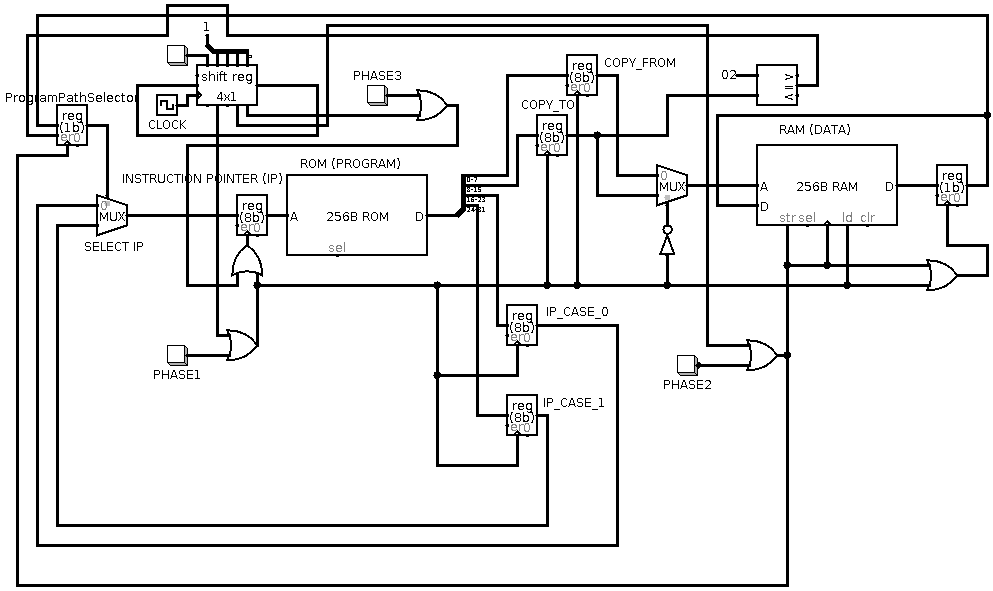
Each instruction consists of four operands and executes in three phases:
| Operand | Meaning |
|---|---|
COPY_FROM |
Memory address of the source bit |
COPY_TO |
Memory address where the bit is written |
IP_CASE_0 |
Next instruction address if PPS = 0 |
IP_CASE_1 |
Next instruction address if PPS = 1 |
| Phase | Action |
|---|---|
| 1. Fetch | Read the bit at address COPY_FROM |
| 2. Copy (“Bit Bit”) | Write that bit to address COPY_TO |
| 3. Jump (“Jump Jump”) | Set instruction pointer to IP_CASE_0 or IP_CASE_1 based on the PPS (Program Path Selector) bit |
The PPS register is memory-mapped at address 0x02 — writing to it controls
program flow. This is the only conditional mechanism and it is sufficient to
achieve Turing completeness.
There are no “words” — the machine operates on individual bits, and word sizes (8, 16, 32, 64-bit, or arbitrary) are composed through sequences of instructions.
Repository Structure
├── docs/
│   └── full-doc.html            # Full documentation (also the GitHub Pages site)
├── LICENSE                      # MIT License
├── circuits_in_logisim/
│   ├── bbjj_cpu.circ            # CPU circuit (open with Logisim-evolution)
│   ├── testing_input_mode.circ  # I/O testing variant
│   ├── rom.txt / ram.txt        # Memory contents for the circuit
│   ├── circuit_schematics.png   # Visual schematic
│   └── README.md                # Logisim-evolution usage notes
├── flowcharts_in_violet/
│   ├── or_gate.activity.violet.html   # OR gate program flowchart
│   ├── not_gate.activity.violet.html  # NOT gate program flowchart
│   ├── flowchart_of_or_gate_program.png
│   ├── flowchart_of_not_gate_program.png
│   └── README.md                # Violet usage notes
└── pcb_in_fritzing/
    └── bit_bit_jump_jump_machine.fzz  # PCB layout (open with Fritzing)
Getting Started
Explore the Hardware Circuit
- Download Logisim-evolution — https://github.com/logisim-evolution/logisim-evolution (free, open source, cross-platform; maintained fork of the original Logisim)
- Open
circuits_in_logisim/bbjj_cpu.circ - Load ROM/RAM content from
rom.txtandram.txt - Simulate and observe the CPU executing instructions cycle by cycle
View Program Flowcharts
- Download Violet UML Editor — https://sourceforge.net/projects/violet/ (free, open source, cross-platform)
- Open the
.activity.violet.htmlfiles to explore the flowcharts interactively - Or view the pre-rendered PNG images directly
Open the PCB Design
- Download Fritzing — https://fritzing.org/
- Open
pcb_in_fritzing/bit_bit_jump_jump_machine.fzz
Software VM Implementations
Several software interpreters and tools are available in separate repositories:
| Language | Repository | Live Demo | Features |
|---|---|---|---|
| JavaScript | copyjump.js | ▶️ Try it | Browser-based VM and tools (web standards) |
| Python | CopyJumpMachine | — | Parses *.prg.txt files; includes a byte-adder program |
| Java | copyjumpvm | — | Parses *.cj numeric format; converts text → numeric format; quick demo included |
Example Program: NOT Gate
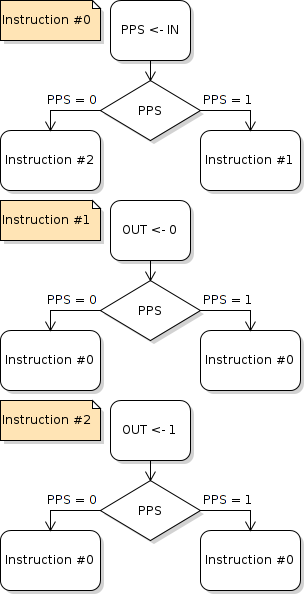
Every program can be represented as a flowchart where each instruction is an assignment (rectangle) followed by a decision (diamond). Here is a NOT gate implemented in RESM:
Key Ideas & Future Directions
- Turing Complete — Any computation can be expressed
- Micro-code style — RESM can serve as a lowest-level layer; higher-level languages can be compiled to it or interpreted on top of it
- Multi-core potential — Many RESM cores running in parallel, synchronized by shared phase timing
- FPGA / ASIC ready — The design is suitable for hardware synthesis (VHDL/Verilog)
- Genetic programming — The bit-level granularity enables micro-mutations for evolutionary algorithms
- Self-modifying code — Programs can rewrite themselves, enabling progressive code decompression and runtime optimization
- Code rewriting & optimization — The uniform format makes program transformation straightforward and granular
Documentation & Links
- 📖 Full documentation: arkenidar.github.io/resm_aka_bbjj/docs/full-doc.html
- 🌐 Esolangs wiki: BitBitJump on Esolangs.org
- 📦 Download ZIP: github.com/arkenidar/resm_aka_bbjj/archive/master.zip
License
MIT — Copyright (c) 2017 Dario “Raw Coder” Cangialosi. See LICENSE for full text.
“Life is unpredictably short — open the sources.” #open_the_sources
#memento_mori